---
title: ¿Cómo puedo hacer retiro parcial o total de mis inversiones?
description: En este artículo te vamos a explicar cómo puedes realizar una solicitud de retiro de tu dinero dentro de MPF Invest
---
[Ir directamente al contenido](https://soporte.mpfinvest.com/centro-de-ayuda/cómo-puedo-hacer-retiro-de-mis-inversiones#main-content)
-1.svg)
Abrir navegación principal
Cerrar navegación principal
- [Contáctanos](https://www.mpfinvest.com/inicio/contacto/)
[Contáctanos](https://www.mpfinvest.com/inicio/contacto/?hsLang=es-co)
¿Cómo podemos ayudarte?
- No hay sugerencias porque el campo de búsqueda está vacío.
1. [Centro de ayuda](https://soporte.mpfinvest.com/centro-de-ayuda?hsLang=es-co)
2. [Retirar](https://soporte.mpfinvest.com/centro-de-ayuda/retirar?hsLang=es-co)
# ¿Cómo puedo hacer retiro parcial o total de mis inversiones?
## En este artículo te vamos a explicar cómo puedes realizar una solicitud de retiro de tu dinero dentro de MPF Invest
1\. Abre la aplicación de MPF Invest e inicia sesión con tu correo y contraseña.
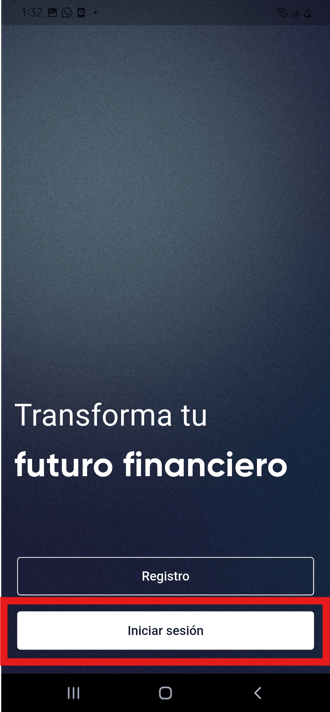
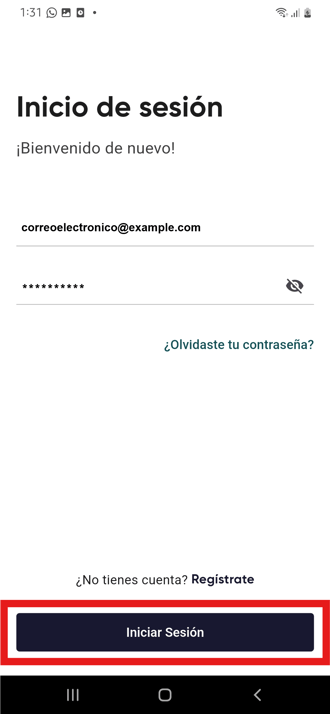
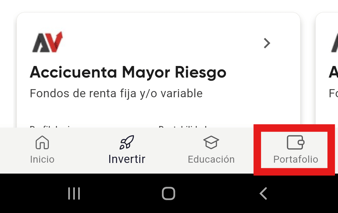
2\. Ve a la opción "Portafolio", en el menú inferior de tu pantalla, y selecciona el fondo del cual quieres retirar dinero.
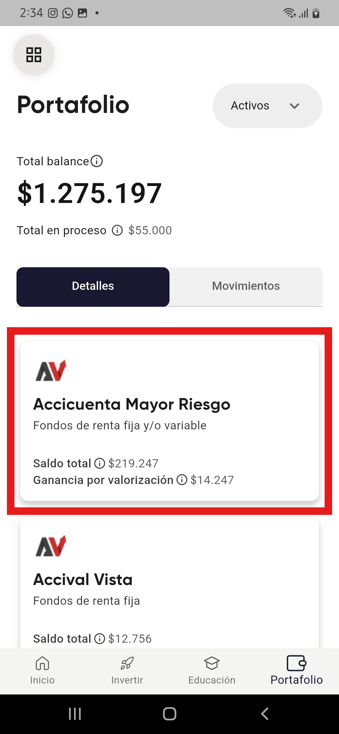
3\. Haz clic en el botón ´retirar´
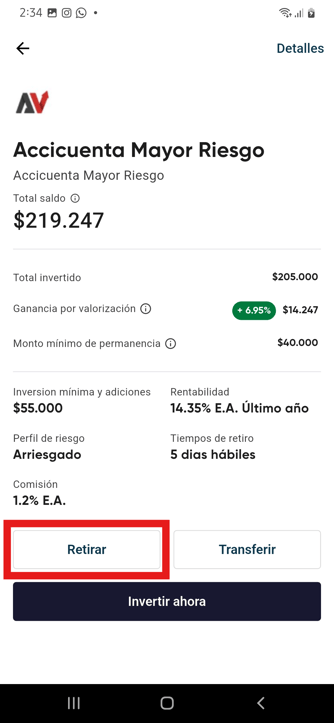
4\. Selecciona el tipo de retiro que deseas hacer
%2011.54.07%20a.m..png?width=260&height=515&name=Captura%20de%20pantalla%202026-03-06%20a%20la(s)%2011.54.07%20a.m..png)
%2011.52.18%20a.m..png?width=260&height=524&name=Captura%20de%20pantalla%202026-03-06%20a%20la(s)%2011.52.18%20a.m..png)
5\. Escribe el monto que deseas mover a tu cuenta bancaria y da clic en "Siguiente".
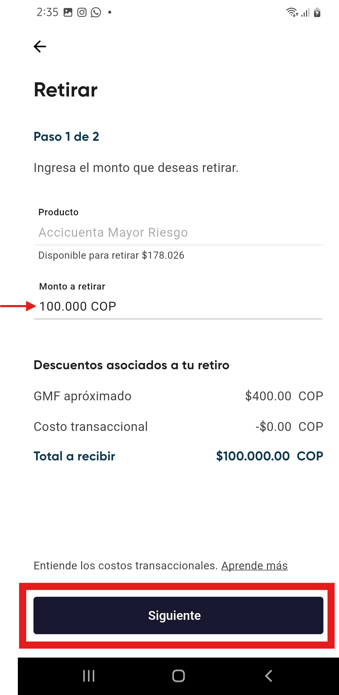
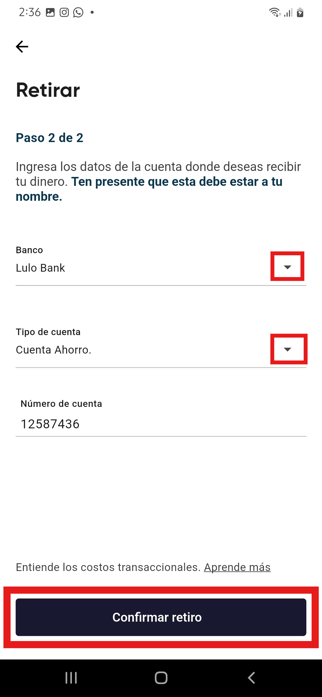
6\. Ingresa los datos bancarios para hacer la transferencia y confirma el retiro.
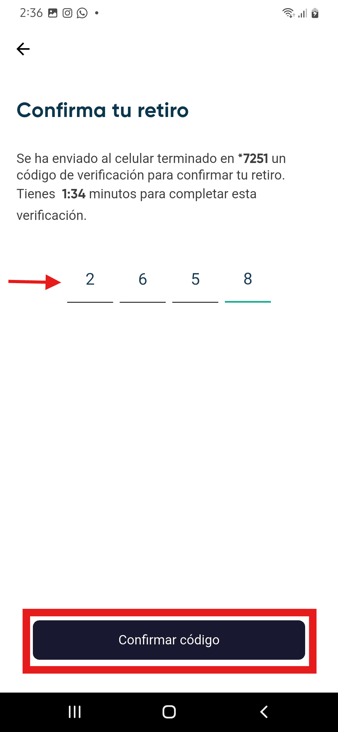
7\. Recibirás un código de 4 dígitos al número celular registrado. Verifícalo para finalizar tu solicitud.
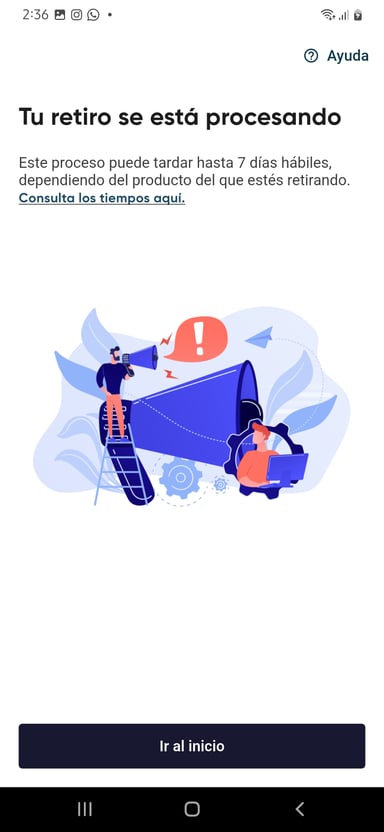
8\. La pantalla te mostrará este anunció, significa que la solicitud de retiro se confirmó y entra en proceso. Ten presente que los retiros no se completan de forma automática.
- [Sobre MPF Invest](https://soporte.mpfinvest.com/centro-de-ayuda/sobre-mpf-invest?hsLang=es-co)
- [Sobre la aplicación](https://soporte.mpfinvest.com/centro-de-ayuda/sobre-la-aplicaci%C3%B3n?hsLang=es-co)
- [Registro](https://soporte.mpfinvest.com/centro-de-ayuda/registro?hsLang=es-co)
- [Sobre Inversión](https://soporte.mpfinvest.com/centro-de-ayuda/sobre-inversi%C3%B3n?hsLang=es-co#main-content)
- [Fondo de Capital Privado](https://soporte.mpfinvest.com/centro-de-ayuda/sobre-inversi%C3%B3n?hsLang=es-co#fondo-de-capital-privado)
- [Aliados de MPF Invest](https://soporte.mpfinvest.com/centro-de-ayuda/aliados-de-mpf-invest?hsLang=es-co#main-content)
- [Acciones & Valores](https://soporte.mpfinvest.com/centro-de-ayuda/aliados-de-mpf-invest?hsLang=es-co#acciones-valores)
- [Bloom](https://soporte.mpfinvest.com/centro-de-ayuda/aliados-de-mpf-invest?hsLang=es-co#bloom)
- [Costos transaccionales](https://soporte.mpfinvest.com/centro-de-ayuda/costos-transaccionales?hsLang=es-co)
- [Reto 12 en 1](https://soporte.mpfinvest.com/centro-de-ayuda/reto-12-en-1?hsLang=es-co#main-content)
- [Participa por tu asesoria](https://soporte.mpfinvest.com/centro-de-ayuda/reto-12-en-1?hsLang=es-co#participa-por-tu-asesoria)
- [Inversores](https://soporte.mpfinvest.com/centro-de-ayuda/inversores?hsLang=es-co)
- [Legal](https://soporte.mpfinvest.com/centro-de-ayuda/legal?hsLang=es-co)
- [Retirar](https://soporte.mpfinvest.com/centro-de-ayuda/retirar?hsLang=es-co)
[](https://mpfinvest.com?hsLang=es-co)
MPF Invest | Todos los derechos reservados
Copyright © 2024, MPF Invest